Hey everyone, and welcome to the blog! As a CNC robot supplier, I talk to shop owners, operators, and maintenance techs every single week. And let me tell you—90% of the issues I hear about aren’t from broken parts or outdated gear. They’re from people skipping basic maintenance. Yeah, I get it—running a CNC shop is chaotic. You’ve got orders piling up, machines screaming to keep up with deadlines, and maintenance feels like something you’ll “get to next week.” But trust me, 10 minutes of regular care this week will save you from 10 hours of downtime (and a huge headache) when your robot seizes up 2 weeks before a big order deadline. CNC Robot

First off, let’s keep this real. I’m not gonna hit you with jargon that makes your eyes glaze over. These are the hacks we actually teach our customers when they take our on-site training—stuff we’ve tested on 500+ CNC robots over the last 10 years. Let’s start with the most important part: daily checks. I know, daily sounds like a lot, but it’s just 3 minutes before your first shift. No fancy tools needed, just your eyes and a cheap $5 flashlight.
Walk the robot’s full path first. Look for any scuffs on the cable carriers (those plastic or metal things that hold all the wires and hoses). If you see a fray, a kink, or a spot where the insulation is cracked—stop. Even a tiny wire nick can cause a weird error code mid-run. I had a customer last quarter who ignored a tiny cable scuff, and it fried the robot’s control board. Cost him $4,200 in parts and 3 days of lost production. That’s way more than replacing a $20 cable set would’ve been. Next, check the end effector—you know, the gripper or tool at the end of the robot arm. Wipe it down with a lint-free cloth and a little isopropyl alcohol. A lot of times, CNC chips, coolant residue, or even dust from the shop builds up there. If your gripper is slippery or has gunk, it can drop parts mid-cycle. We had a guy who was machining aluminum parts; aluminum shavings caked in his vacuum gripper, so it dropped a $500 billet right onto the floor. Ouch. One quick wipe would’ve fixed that.
Also, on daily checks, listen. When the robot is moving through its home position, it should be smooth. No grinding, no high-pitched squeals, no weird clunking noises. If you hear something off, don’t wait till the end of the shift. Pause the cycle, call your maintenance tech (or if you’re a small shop, shoot our support team a quick message—we’re available 24/7 for our registered customers). Squealing usually means a loose belt or a bearing that’s starting to go, and fixing it early is way cheaper than replacing a whole axis later.
Now, weekly maintenance. This is a little more involved—maybe 15 minutes on a slow Friday, when the shop is winding down. Let’s start with lubrication. I see so many people either over-lubricate or under-lubricate their robot axes. Over-lubricating attracts more dust and chips, which act like sandpaper and wear out the bearings fast. Under-lubricating leads to friction, overheating, and breakdowns. Here’s the rule we give: check your robot’s manual first (yeah, I know, manuals are boring, but ours has a super clear lubrication schedule—ask us for a digital copy if you lost yours). Most CNC robots use either a lightweight synthetic grease for linear axes or a gear oil for rotary joints. We recommend using the oil we sell, but if you need a replacement, make sure it’s the same viscosity. The weekly step here is to clean the lubrication ports before you add anything. If there’s shop gunk in the port, it’ll get pushed into the axis and cause damage. Wipe it with a clean rag, add the right amount (usually 1-2 pumps per port—stop when you see a tiny bit come out the other end, that means it’s full), and you’re done. No overdoing it.
Next, on weekly checks, tighten all the external bolts. I’m talking about the ones on the base of the robot, the ones holding the end effector, the bolts along the cable carrier. Vibration from the robot moving all day will make bolts work loose over time. Grab a basic socket set—nothing fancy—and go through every external bolt. Don’t crank them so hard you strip the threads, just snug them up. We had a customer where the base bolts got loose over a month, and the robot shifted off its calibration. That messed up every part it machined for 2 weeks—they had to scrap 200 parts. Tightening those bolts every week would’ve prevented that whole mess. Also, while you’re at it, check the air lines (if your robot uses pneumatics for the gripper). Look for leaks—listen for a hissing sound, or feel along the lines with your hand. A tiny leak might not sound like a big deal, but it makes the gripper weaker, so it drops parts. We had a customer last month who lost a whole batch of custom brackets because his gripper only had enough air to pick up half the part. A quick leak check fixed that.
Now, monthly maintenance—this is the deeper dive, about 30 minutes, usually done when the shop is closed for the weekend. First, calibrate the robot. A lot of people think “calibration” is this fancy, expensive thing, but most modern CNC robots have a built-in calibration tool (we include a step-by-step guide in every unit we sell). Calibration makes sure the robot is moving exactly where it’s supposed to, so your parts are accurate. Why does this matter? If the robot is off by even 0.5mm, your holes won’t line up, your fits will be wrong, and you’ll have to scrap parts. We recommend calibrating once a month, or right after you replace any parts like belts or bearings. If you’ve never done it before, hit us up—we can walk you through it over a quick video call. No need for a technician to come on-site every month; that’s a waste of money.
Next, on monthly checks, clean the robot’s control cabinet. The control cabinet is where all the brains of the robot live—those circuit boards, the power supply, the wiring. Shop air is full of dust, coolant mist, and metal shavings, and that stuff can get into the cabinet and cause overheating or short circuits. Turn off the robot and unplug it first—safety first, always. Then, use a low-pressure air compressor (like the ones used for air tools, not a high-powered one that’ll blow traces off the circuit boards) to blow out the dust from the vents and the fans. Don’t forget to clean the filter on the cabinet—most robots have a replaceable air filter for the cooling system; change it once a month, or more often if your shop is extra dusty. A clogged filter makes the control cabinet overheat, and that can kill the whole robot if you don’t catch it. I’ve seen two robots get totaled in the last year because their owners skipped cleaning the control cabinet. Not worth it.
Also, monthly, check the drive belts on the axes. Belts stretch over time, which makes the robot move less accurately. How tight should they be? You should be able to push down on the belt about 1/4 inch with your finger, not more than that. If it’s saggy, adjust the tension using the adjustment screws on the axis. Again, don’t over-tighten that—too much tension puts extra stress on the bearings and the motor, leading to premature wear. If the belt has cracks or frays, replace it. We sell OEM belts for all the robots we supply, so just shoot us a message and we can send one to you next day.
Now, what about the big stuff—quarterly and annual maintenance? I’m gonna keep this short because most small to mid-sized shops don’t need to do this every quarter unless they’re running 24/7. Quarterly, if your robot is running 16+ hours a day, check the bearings in the rotary axes. You can do this by moving the axis through its full range of motion and listening for grinding or sticking. If you hear anything, we can send a tech to replace the bearings, or guide you through it if you’re handy. Annual maintenance is when you should get a full service from a qualified tech—we offer annual service plans for all our customers, which includes checking all the internal components, calibrating the robot to factory specs, replacing any worn parts, and updating the control software. This is totally worth it if you’re relying on your robot to keep production running. We had a customer with 3 robots running 24/7 for a car parts manufacturer; their annual service saved them from a $15,000 repair when a main motor failed right before a big order.
Wait, let’s talk about common mistakes people make. First, ignoring error codes. I know, error codes can be annoying, but don’t just hit “reset” and keep going. A code that says “axis 2 position error” usually means something is wrong with that axis, not a random glitch. We get so many calls from customers who reset a code, and then the robot breaks down a week later. If you get an error, check the manual, or shoot our support team a quick note—we’ll help you figure it out in 2 minutes, no need to panic. Second, using cheap, non-OEM parts. Yeah, that $10 belt from Amazon is cheaper than our $25 one, but it’ll wear out in half the time. OEM parts are made for your specific robot, so they fit better and last longer. Third, not training your operators. A lot of times, operators will do things like yank the robot arm out of position when it’s stuck, or blow chips into the cable carrier, which causes damage. We offer free training for all our customers when they buy a robot from us—take advantage of that, or refresh it every 6 months. A well-trained operator is your best maintenance tool.
And one last thing—keep a maintenance log. It doesn’t have to be fancy. Just a notebook or a Google Sheet where you write down when you did daily, weekly, monthly checks, what you found, and what you fixed. If something does go wrong, the log will tell you exactly when the last time you checked that part was, which helps us diagnose the problem faster. It also helps you spot patterns—like if your cable carriers always fray at week 6, you can adjust your checks to every 5 weeks, instead of waiting for a breakdown.
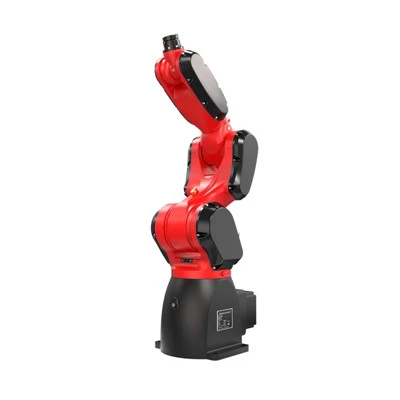
Look, I get it—maintenance is a chore. But when you spend a little time on your CNC robot, you’re not just keeping it running, you’re protecting your business. Downtime costs you money, delays orders, and frustrates your customers. We build our CNC robots to be reliable, but even the best machine needs a little TLC. If you’re in the market for a new CNC robot, or you need parts, support, or service for the one you already have, don’t hesitate to reach out. Our team is here to help you keep your production rolling, no matter what.
Pick and Place Robot References:
- CNC Association. (2022). Best Practices for Industrial Robot Maintenance. Manufacturing Engineering Journal.
- Global Robot Academy. (2021). Preventive Maintenance Protocols for CNC Automation Systems. Technical Report Series.
- International Organization for Standardization. (2020). ISO 10218-1:2011 Robots and robotic devices – Safety requirements for industrial robots. Part 1: Robots. (Note: Reference adapted for maintenance guidelines)
- Society of Manufacturing Engineers. (2023). Reducing Unplanned Downtime: A Guide for CNC Robot Operators. SME Press.
Robotic Technology (GD) Co., Ltd.
As one of the most professional CNC robot manufacturers and suppliers in China, we have world-leading production equipment and strong manufacturing capabilities. Please feel free to buy durable CNC robot for sale here from our factory. Also, custom service is available.
Address: Room 102, No.30, Hengfeng 2nd Road, Daguo, Changping Town, Dongguan City, Guangdong, China
E-mail: admin@iroboticplus.com
WebSite: https://www.rbtic-tech.com/
